Mini Trans

Read and write,without borders.

Mini Trans is a free AI translation and writing assistant.Bilingual webpage translation, selection lookup, AI writing, and YouTube bilingual subtitles.

calmtech.example.org/fr/essais/interfaces-calmes
ESSAI · DESIGN & LOGICIEL

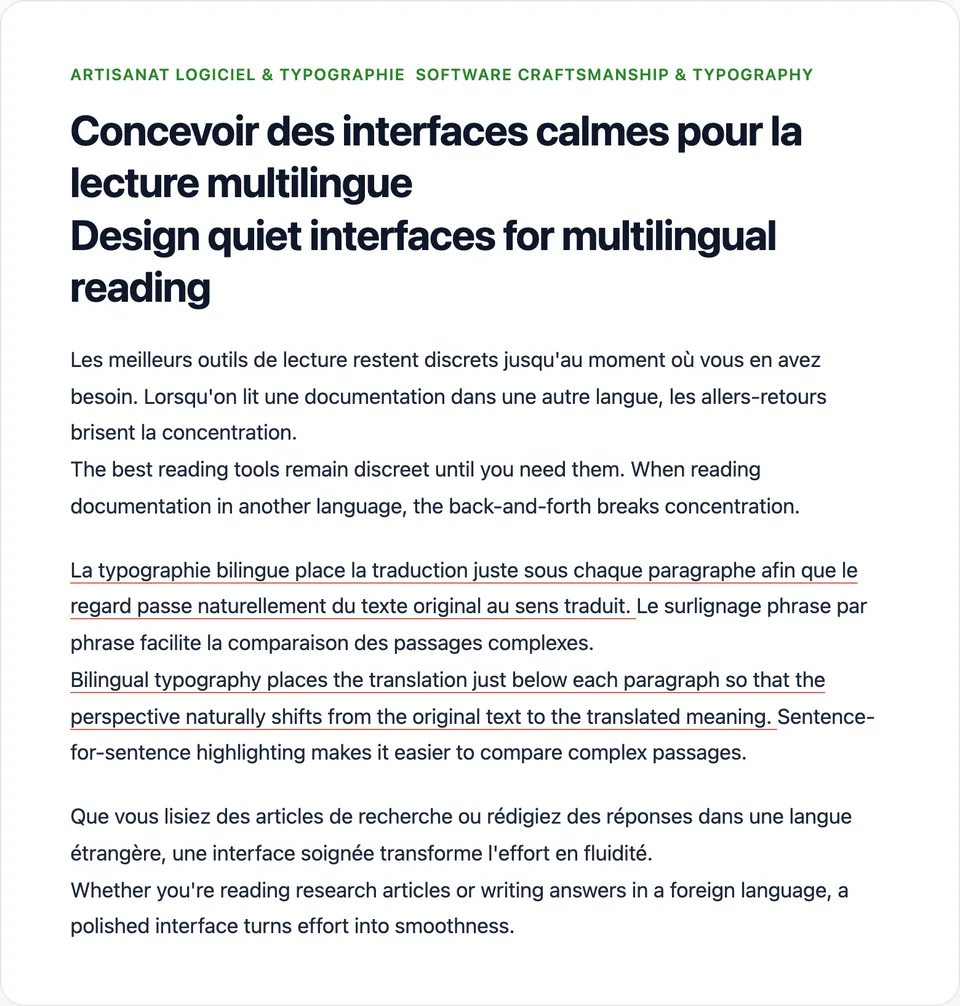
Concevoir des interfaces calmes pour la lecture

Elena Vance · 6 min · French → English

Les meilleurs outils de lecture respectent votre rythme et n'offrent qu'une aide éphémère au moment précis d'une hésitation.

The best reading tools respect your pace, surfacing ephemeral assistance only at the exact moment of hesitation.

Lorsque l'interface reste translucide et ancrée, le lecteur ne perd jamais le fil d'un long argument. Lire dans une autre langue devient fluide plutôt qu'une série d'interruptions.

When the interface stays translucent and anchored, readers never lose their place in a long-form argument. Reading in another language becomes effortless rather than a series of interruptions.

Pour relire des articles techniques ou répondre à l'étranger, un design soigné transforme la friction en fluidité.

Whether reviewing technical essays or replying abroad, thoughtful design turns friction into flow.

Tip: Hover or click any sentence above to highlight both languages together
Built for calm reading and effortless writing.

Bilingual page translation, instant selection cards, and in-page AI writing—right where you work.

Real screenshot of Mini Trans bilingual webpage translation

Webpage Translation

Side-by-side bilingual text, highlighted by sentence.

Preserves page layout with custom translation styles, site rules, and sentence-level hover highlighting.

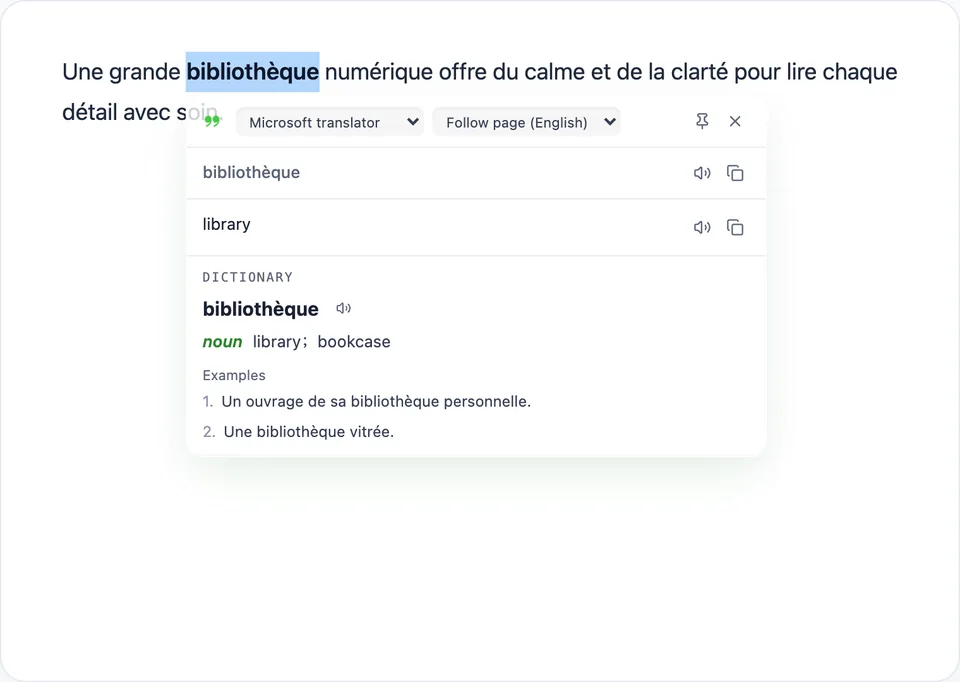
Real screenshot of Mini Trans selection translation and dictionary card

Selection & Dictionary

Translate on select, with dictionary and TTS.

Highlight any word or phrase for multi-service translations, dictionary definitions, examples, and text-to-speech.

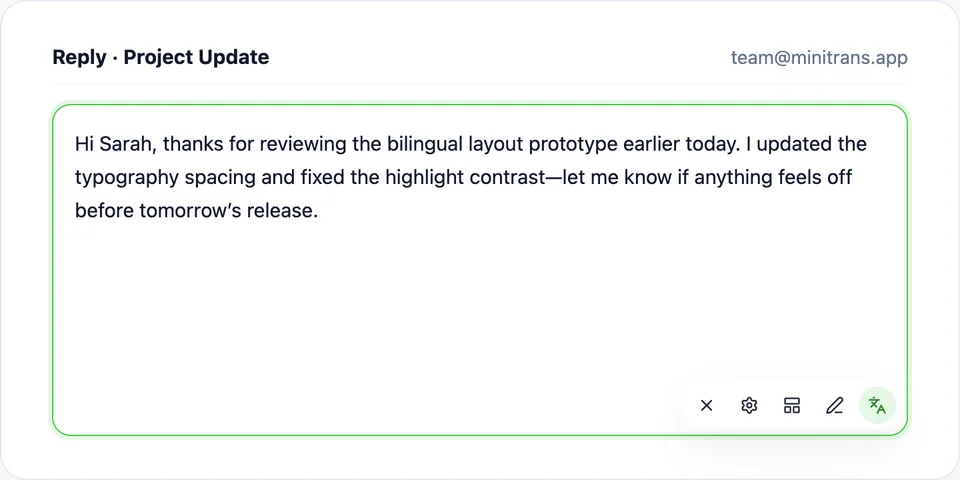
Real screenshot of Mini Trans AI writing input toolbar

AI Writing

Polish, fix grammar, and translate inside any input.

Refine replies right inside text fields or open the AI writing workbench without leaving the page.

Calm controls, right where you browse.

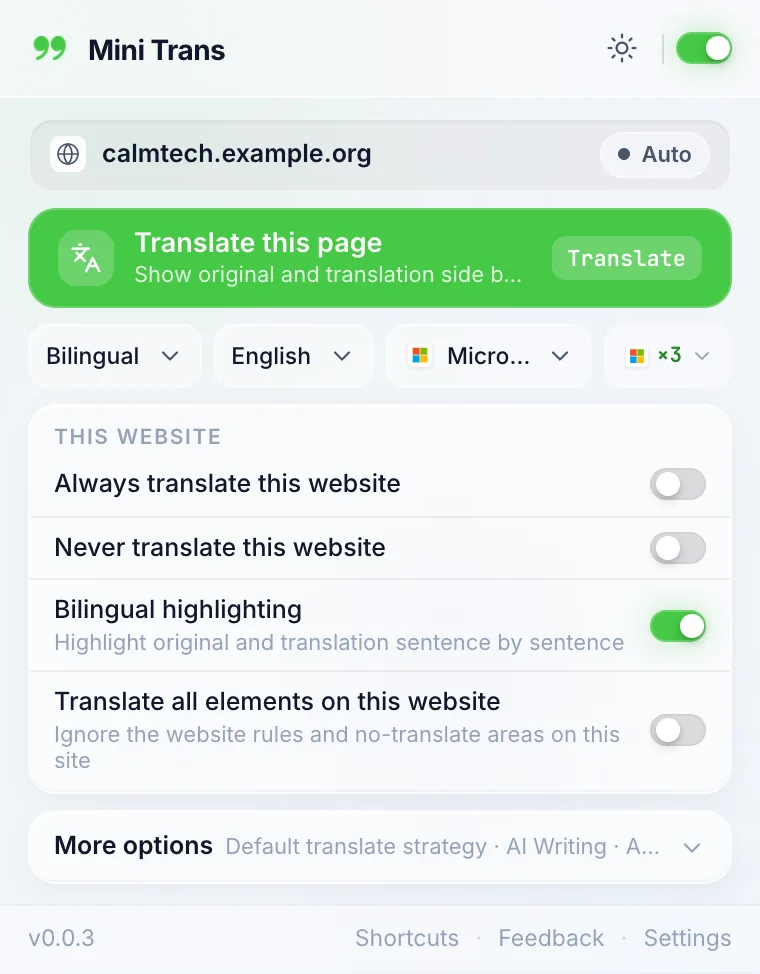
Switch translation state in one click from the popup Command Deck, or fine-tune every workflow inside the structured Options dashboard.

Mini Trans
calmtech.example.org
Auto
EnglishMMicrosoft×3
THIS WEBSITE
Always translate this website
Never translate this website
Bilingual highlightingHighlight sentences side by side
ShortcutsFeedbackSettings
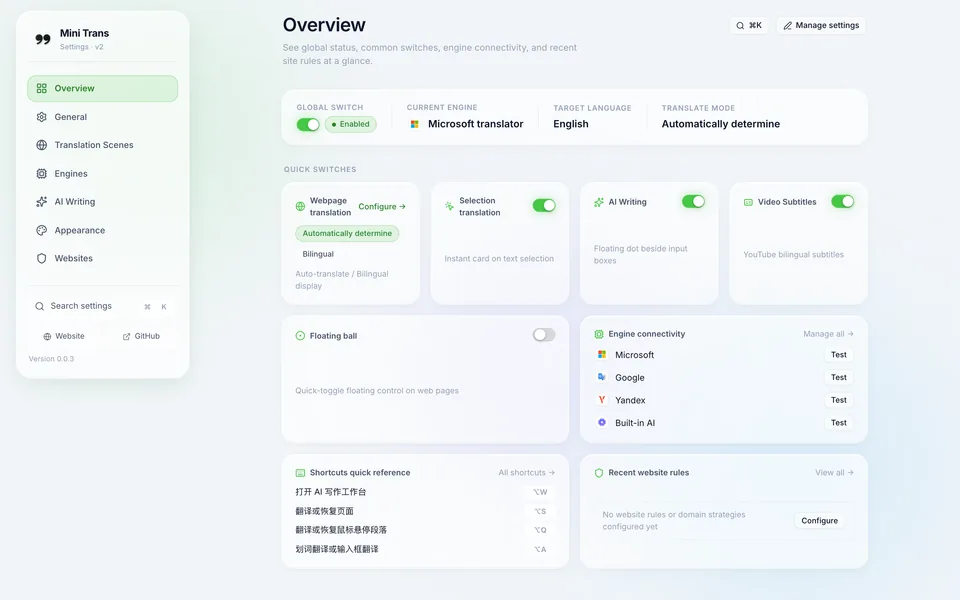
Real screenshot of the Mini Trans Options overview page

Options Overview

Organized by how you read and write

  • Live status & engine connectivity checks

    See active engines, quick toggles, and latency checks across translators at a glance.

  • Per-scene engines and triggers

    Assign separate translators or AI models to webpage, selection, input, and video subtitles.

  • Per-domain rules & CSS exclusions

    Configure always/never lists, excluded selectors, custom CSS, and rule subscriptions.

  • Shortcuts, float ball, and cross-device sync

    Customize gestures and floating ball style, and sync via WebDAV, Google Drive, or JSON.

Thoughtful tools for every workflow.

Every module can be toggled and tailored to fit how you read and write.

Example Use Cases

Designed to stay out of the way until you need it.

“Bilingual layout keeps the original and translation side by side, and sentence highlighting makes dense articles easy to follow.”

Technical Docs · Bilingual View

“Selection lookup shows translations, dictionary entries, phonetics, and audio right where I read.”

Research Reading · Quick Dictionary

“Polishing and translating drafts directly inside text boxes saves so much copy-pasting.”

Global Teams · In-Place AI Polish

“YouTube bilingual subtitles with hover dictionary lookup turned video tutorials into effortless reading.”

Video Learning · YouTube Subtitles

“Works with free built-in translators as well as my own OpenAI, DeepSeek, or Ollama setup, with WebDAV sync.”

Multi-Device · WebDAV & Drive Sync

“Zero telemetry and no usage tracking, free to use across Safari, Chrome, Edge, and Firefox.”

Privacy First · Free to Use

Private by design, free and local-first.

Available for Safari, Chrome, Edge, Firefox, and Chromium browsers

  • Chrome
  • Edge
  • Firefox
Visit GitHub

Questions, answered.

What are the default shortcuts? Can I customize them?

Default browser shortcuts are Alt+S (translate/restore page), Alt+A (selection/input box), Alt+Q (mouse-over paragraph), and Alt+W (AI writing workbench). You can also enable double-tap Ctrl / Alt gestures or configure custom function shortcuts inside Settings › Appearance. On Safari 26+, browser shortcuts can be edited in Safari › Settings › Extensions.

How do Safari users enable Mini Trans?

Mini Trans for Safari requires macOS Safari 18.4 or later. After installing, open Safari › Settings › Extensions, enable Mini Trans, and set website access to “Allow on All Websites” so translations and selection cards can render on pages.

Which translation and AI services are supported?

Translation services include Microsoft, Google, Yandex, browser built-in AI (Chrome & Edge), DeepL, Azure Translator, Google Cloud Translation, and Baidu. AI providers include OpenAI, DeepSeek, Alibaba Cloud Model Studio, Gemini, OpenRouter, Claude, Ollama, and custom compatible endpoints.

Is Mini Trans free? Do I need my own API key?

Mini Trans is completely free with no in-app purchases and no account required. Built-in Microsoft, Google, Yandex, and browser built-in AI work right away without keys. DeepL, Azure, Google Cloud, Baidu, and hosted AI providers require your own API key from those services; Ollama runs locally for free.

Does Mini Trans collect or upload my data?

No. The extension contains zero analytics or telemetry code. Text is sent only to the translation, dictionary, TTS, or AI service you choose when you trigger an action. With browser built-in AI, translation happens entirely on your device.

How can I sync my settings across devices?

You can sync via Google Drive (Chrome, Edge, Firefox; not available on Safari) or WebDAV, or export/import JSON backups. API keys stay local by default and are only synced if you explicitly enable “Include API keys”.

Which browsers are supported?

macOS Safari 18.4+, Google Chrome, Microsoft Edge, Mozilla Firefox, and most Chromium-based browsers.

Can I control which parts of a website get translated?

Yes. Mini Trans includes built-in site rules and lets you define custom translate selectors, no-translate exclusions, custom CSS, and rule subscriptions under Settings › Websites.

What does YouTube bilingual subtitles support?

You can display bilingual, translation-only, or original subtitles, look up words on hover, download subtitle tracks, customize subtitle styles, and enable AI sentence segmentation.

Still have questions? Open an issue on GitHub

Read and write, without borders.

Free AI translation & writing assistant for Safari, Chrome, Edge, and Firefox.